How to make a book trailer
To make a book trailer, choose one scene that sells the story without spoiling it, cut it to about 150 words for a 60-second video, show the characters and the mood instead of summarising the plot, and end on the title, your name and where to buy. You can build one from stock footage in a template editor, hire someone, or paste the scene into Nima's Long-form Video, which draws your characters and has them speak the book's own lines. The first trailer there is free.
Your first trailer is free.
Three ways to make one
| Way | What you get | Cost | Your part |
|---|---|---|---|
| A template editor | Stock clips, your cover, text and music | Free with a watermark, or about $9 to $29 a month | You find the footage and do the edit |
| Hire it out | Usually stock footage and text, sometimes actors | About $250 to $2,000 for stock footage, $3,000 and up for live action | You brief, wait and give notes |
| Animate your own pages | Your characters drawn, voiced and speaking a scene from the book | Free trailer first, then plans by the minute from as low as $10 a finished minute | You paste the scene and approve the look, cast and voices |
Templates are quick and look like every other trailer made from the same template. Hiring gets you a person's judgement and takes weeks. Animating your own pages is the only one of the three in which a reader meets your actual characters. The rest of this page is the method for that one, and most of it applies to the other two.
Step 1: pick a scene, not a synopsis
A trailer that explains the plot is a blurb read slowly. A trailer that stages one scene makes the reader want the next one. Pick a moment from the first third of the book, so nothing is spoiled, where somebody wants something and somebody else is in the way.
Our Three Musketeers trailer is one scene: D'Artagnan turns up to fight three duels and ends up fighting beside the men he came to fight. Our Frankenstein film is one sentence of setup, "It was on a dreary night of November", and one image, the eye opening. Neither tells you what the book is about. Both tell you what reading it feels like.
Step 2: cut it to the length
Narrated film runs at about 150 words a minute. That gives you a word budget before you make anything:
| Video | Words of your text | Good for |
|---|---|---|
| Teaser, 15 to 30 seconds | 40 to 75 | Cover reveals, preorder posts, ads |
| Trailer, 60 to 90 seconds | 150 to 225 | Your book page, YouTube, your newsletter |
| Scene, 2 to 5 minutes | 300 to 750 | Readers who already follow you, events, crowdfunding |
Publishing guides land in the same range. Reedsy says most book trailers run about 30 to 40 seconds. Kindlepreneur advises staying under two minutes and finds 30 seconds the right balance. The Alliance of Independent Authors suggests one to one and a half minutes.
Keep the lines that carry a voice. If a character says something only they would say, that line stays. Description can go, because the picture does that work now.
Step 3: choose a look that fits the genre
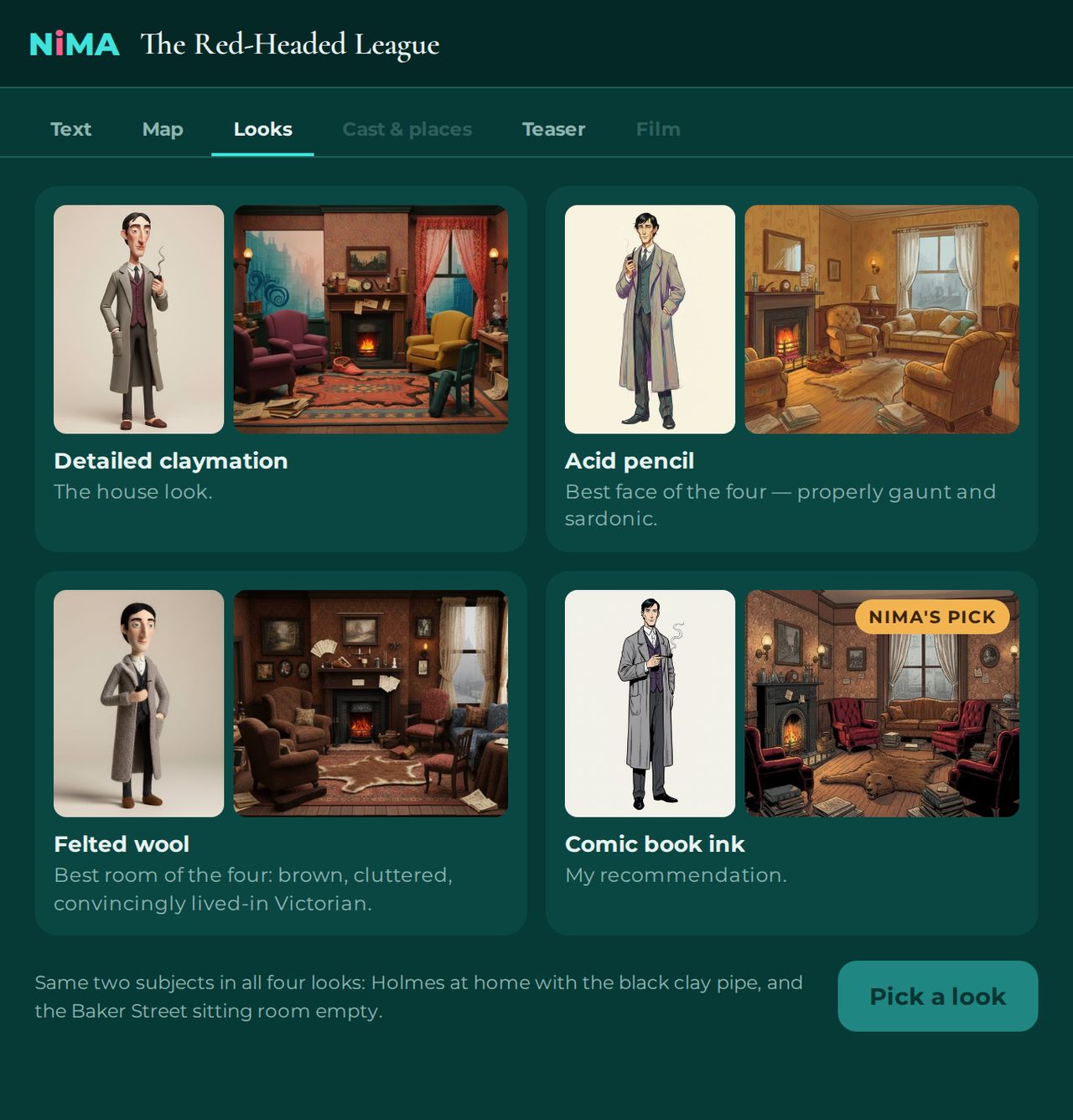
The look is the first thing a viewer reads, before any word. Clay gives weight and a little dread, which is why we used it for Frankenstein and Sherlock Holmes. Felted wool is warm and domestic. Comic book ink is fast and loud. Acid pencil, drawn in coloured pencil, is the most like an illustrated edition. Paper love is cut paper, bright and theatrical, which is why our Three Musketeers trailer wears it.
Step 4: cast it and voice it
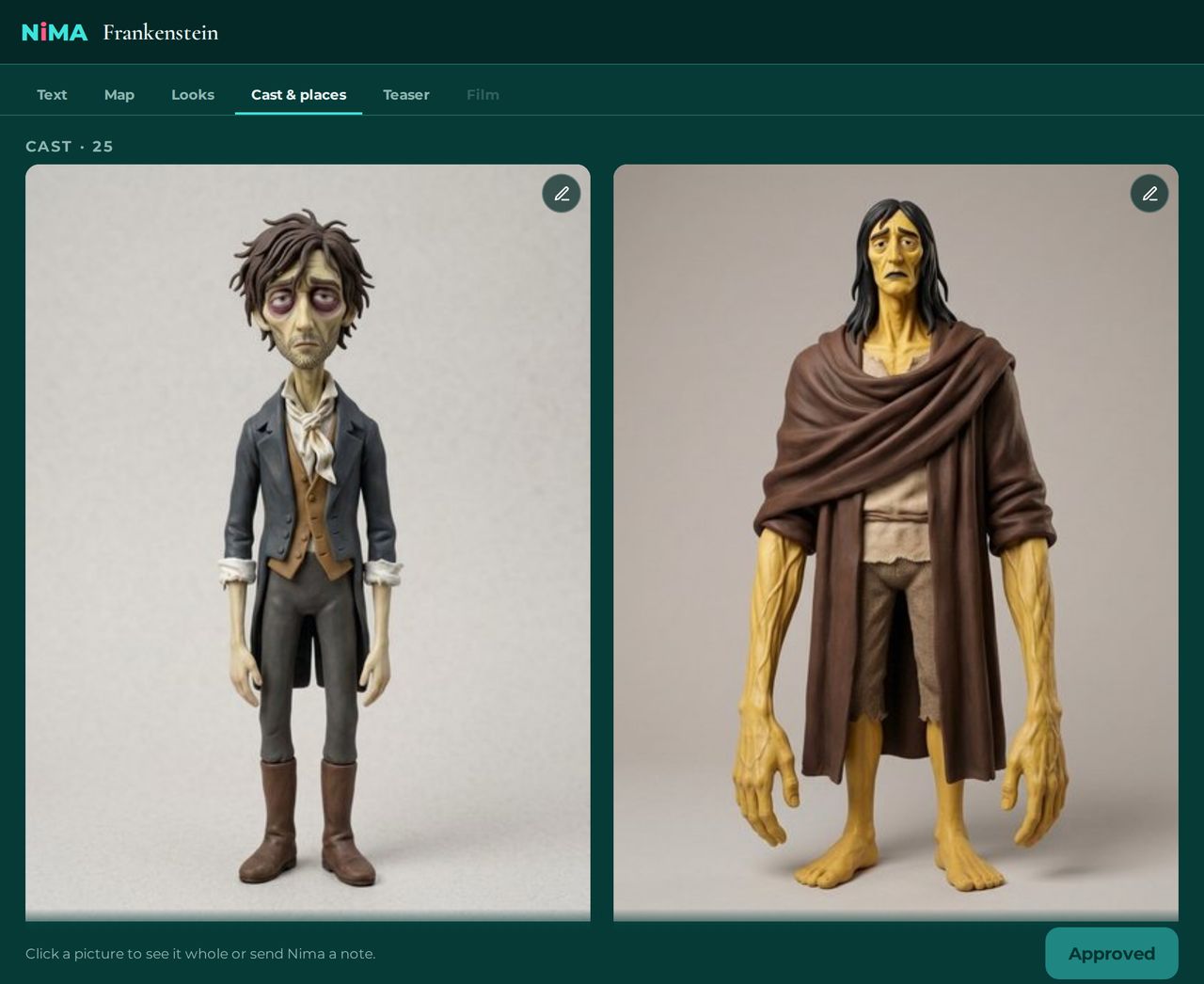
Readers will take your trailer's faces as canon, so get them right before anything moves. In Long-form Video each character is drawn once from the description in your text and reused in every shot. If the hair is wrong or the coat is the wrong century, leave a note on the picture and it is redrawn.
Then the voices. Each speaking character gets five auditions reading a line from your book. Pick with your eyes closed: the right voice is the one you stop noticing.
Step 5: make it
- Paste your pages. Open Long-form Video and paste the scene, chapter or short story you want filmed, between 150 and 10,000 words. Nima reads it, maps the scenes, the cast and the places, and asks before it cuts anything.
- Pick a look. Detailed claymation, felted wool, comic book ink, acid pencil, which is coloured pencil, or paper love, which is cut paper. Nima can draw your lead character and your main location in all five so you compare them side by side.
- Approve the cast and the places. Every character is drawn once, from the descriptions in your text, and every location is built once as a set. Leave a note on any picture and Nima redraws it.
- Pick the voices. Each speaking character gets five voice auditions, each one reading a line from your book. Choose the one that sounds like the person you wrote.
- Watch your free trailer. Nima cuts a trailer of 15 to 20 seconds from your text: several of its places and people, two or more of your lines spoken word for word, music under it, your title at the end. You see it first as a storyboard with the voices, give one round of notes, then start a free 7-day trial and it is fully animated. Nima emails you when it is ready.
- Make the film, if you want more. Pick a plan, metered in minutes of finished film, and Nima films the text scene by scene. You review a full draft with the voices, leave notes in each round your plan includes, then approve the render. The finished film is yours to download and share with a link.
Step 6: finish it and post it
A trailer has a job to do after the scene ends. Close on a card with the cover, the title, your name, the release date and one place to buy, and add music if the scene wants it. We can make the title card and add the music for you: write to hello@nima.mov. If you add music yourself in an editor, use a track whose licence covers the places you will post, and put the credit in the description when the licence asks for one.
- YouTube. Post the widescreen file. YouTube treats any square or vertical video of up to three minutes as a Short, so keep the trailer 16:9 if you want it to sit on your channel as a normal video.
- Your website and newsletter. Embed the YouTube video on the book's page, above the buy links.
- Goodreads. Your author profile takes videos, book trailers included, added as a link to the video where it is hosted.
- TikTok, Reels and Shorts. Post the vertical version. A trailer is far inside every platform's length limits.
- Amazon. Do not plan around it. Amazon.com stopped showing videos on author pages in December 2022, according to Reedsy, and the A+ Content you can add to a book's page through KDP takes images, text and comparison tables, not video.
Mistakes that lose the viewer
- Opening on the title. Nobody knows the title yet. Open on a person or a line.
- Telling the whole plot. One scene is enough. Leave the question open.
- Text the viewer cannot read in time. If it is on screen for two seconds, it gets six words.
- A different face in every shot. If the heroine changes between cuts, the viewer stops believing in her.
- No ending. The last frame is the title, your name and where to get the book.
Common questions
How long should a book trailer be?
Between 30 and 90 seconds. Reedsy says most book trailers run about 30 to 40 seconds, Kindlepreneur advises staying under two minutes and favours 30 seconds, and the Alliance of Independent Authors suggests 60 to 90 seconds. At about 150 words a minute, that is 75 to 225 words of your text.
How do I make a book trailer for free?
Two ways. A template editor with a free tier lets you assemble stock clips and text yourself. Nima's Long-form Video makes one free animated trailer per account, 15 to 20 seconds, from a scene you paste, with your characters drawn and voiced.
What should a book trailer include?
One scene or one strong image from early in the book, a line or two in a character's voice, the mood of the genre, and an end card with the cover, title, author, release date and where to buy.
Can I make a book trailer with AI?
Yes. In Long-form Video you paste the scene, pick a look, approve the characters it draws from your descriptions and choose their voices. It then animates the scene with the characters speaking the book's own lines.
Do I need a script for a book trailer?
Your book is the script. Pick the scene and cut it to about 150 words for 60 seconds. Long-form Video uses only lines that are in your text, so there is nothing new to write.
Do book trailers need to be vertical?
For TikTok, Reels and Shorts, yes. For YouTube, your website and most retailer pages, widescreen. Long-form Video films come in both.
Paste one scene and watch its trailer, free. Make my free trailer.